

1.0.0.0.10: What Went Wrong With This IP?
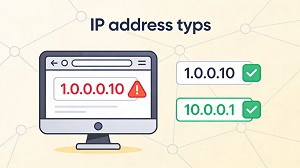 If you’ve ever typed 1.0.0.0.10 into your browser or router settings and wondered why nothing works, you’re definitely not alone. It looks like a normal IP address at first glance, but there’s a small formatting issue that makes it completely unusable in real-world networks.
Why 1.0.0.0.10 Isn’t a Real IPv4 Address
IPv4 addresses follow a simple rule: they must contain exactly four numbers (called octets) separated by dots, and each number must be between 0 and 255. A classic example is something like 192.168.1.1, which fits the format perfectly.
Now compare that to 1.0.0.0.10: instead of four octets, it has five, which immediately breaks the IPv4 standard. Routers, computers, and network tools won’t understand it, so any attempt to use 1.0.0.0.10 will fail just like sending a letter with a postal code that has too many digits.
In practice, when someone types 1.0.0.0.10, they’re almost always aiming for a valid address such as 1.0.0.10 or 10.0.0.1 instead.
How People End Up Typing 1.0.0.0.10
This kind of mistake usually comes from simple human error rather than a lack of technical knowledge. Some of the most common reasons include:
- Adding an extra number (extra octet) when typing quickly
- Mixing up subnet notation and host addresses
- Copying long IP strings from printed manuals or emails
- Copy‑pasting from online examples without checking the format
Any of these can easily turn a valid IP into something like 1.0.0.0.10, which looks almost right but doesn’t actually work.
Valid IPs You Probably Meant
If 1.0.0.0.10 keeps showing up in your notes or configs, chances are you were aiming for one of these valid addresses or notations:
- 1.0.0.10 – A perfectly valid IPv4 address inside the 1.0.0.0 network.
- 10.0.0.1 – A very popular private IP, often used as the default gateway for home and office routers.
- 192.168.1.1 – Another well-known private IP, commonly used in residential networks.
- 1.0.0.0/24 – Not a single device’s IP, but a subnet that covers all addresses from 1.0.0.0 to 1.0.0.255.
Using one of these instead of 1.0.0.0.10 ensures your devices can actually talk to each other and to your router. The broader range 1.0.0.0/8 (from 1.0.0.0 to 1.255.255.255) is managed by APNIC, the Asia‑Pacific Network Information Centre. Addresses within that block, including 1.0.0.10, are typically handed out to internet providers in the Asia‑Pacific region. A lot of the confusion around 1.0.0.0.10 comes from mixing IP addresses with subnet notations. Here’s a quick refresher to keep things clear: When someone tries to blend those ideas together, they might accidentally write an extra “.0” and end up with 1.0.0.0.10. If you run into an address that doesn’t work, you can use a simple mental checklist to clean it up. Often, turning 1.0.0.0.10 into 1.0.0.10 or 10.0.0.1 is all it takes to get your connection back on track. Private IPs such as 10.0.0.1 and 192.168.1.1 are the backbone of typical home and small‑office networks. They let your devices communicate with each other and with your router without exposing every device directly to the public internet. Knowing these common private addresses makes it much easier to configure routers, firewalls, and smart devices without accidentally opening them up to the outside world. It also helps you quickly spot when something like 1.0.0.0.10 is just a typo rather than a mysterious “new” IP format. To wrap it up, here are the core ideas to keep in mind next time you’re working with IP addresses: Mistyping an IP is very common, especially if you’re just getting comfortable with networking. Once you know what went wrong with 1.0.0.0.10 and how to fix it, you’re already one step closer to smoother, more reliable network setups.
By contrast, addresses such as 10.0.0.1 come from a special private IP range defined by RFC 1918 and are meant only for internal networks. These private addresses aren’t routed on the public internet, so you can freely use them in your home or office without asking your ISP for permission.Subnets, Gateways, and Where Confusion Starts
How to Fix an Invalid IP Like 1.0.0.0.10
Why Private IP Addresses Are So Important
Main Lessons to Remember