

OpenAI Ditches Passwords for High-Security Users
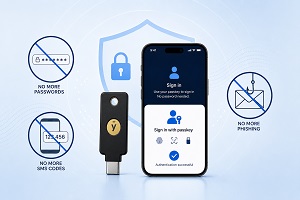 OpenAI has launched Advanced Account Security, a new optional feature for ChatGPT and Codex that removes traditional passwords entirely. The system uses hardware security keys or software-based passkeys instead, offering top-tier protection against even the most determined hackers.
Who Should Use It
The feature is aimed at people facing higher digital attack risks, including government officials, corporate executives, journalists, researchers, human rights activists, and political dissidents. However, it’s available to anyone who wants extra security for their account.
How It Works
Advanced Account Security eliminates email and password logins, which hackers can steal or phish. Instead, you’ll sign in using either a physical USB security key or a passkey stored on your device (computer or smartphone). Neither can be stolen through remote digital attacks, making them far more secure than traditional passwords.
You’ll need to set up two authentication methods during enrolment – either two hardware keys, two passkeys, or one of each. The extra key acts as a backup in case you lose the primary one.
Discounted Security Keys Available
OpenAI has partnered with Yubico to offer a custom bundle of two hardware keys for £53 (normally £98). The bundle includes the YubiKey C NFC and YubiKey C Nano, which is designed to stay plugged into your laptop for simple daily logins. Security keys from other vendors are also supported.
Strict Recovery Rules
The new security mode is extremely locked down. It disables account recovery through email and SMS codes completely, as these can be phished. OpenAI’s support team can’t recover your account either, even if you contact them directly.
If you lose access, your only recovery options are backup passkeys, security keys, or recovery keys that OpenAI issues during setup. These recovery keys are strings of digits you’ll need to store somewhere safe.
Additional Security Features
Login sessions are shortened to reduce exposure if your device gets compromised, so you’ll need to sign in more frequently. You can review and disconnect all active sessions across your devices through a dashboard. The system also sends alerts whenever someone logs into your account.
Accounts enrolled in Advanced Account Security are automatically excluded from AI model training, though you can change this in Settings > Data Controls.
Similar to Google’s Programme
The feature works much like Google’s Advanced Protection Program, which launched in 2017. Google introduced its programme after Russian state-sponsored hackers used a spear-phishing attack to access John Podesta’s Gmail account during Hillary Clinton’s 2016 presidential campaign. OpenAI says its programme isn’t responding to any specific incident but is designed to prevent future threats.
Mandatory for Some Users
From 1st June 2026, participants in OpenAI’s Trusted Access for Cyber programme must enable Advanced Account Security. Enterprises can use phishing-resistant single sign-on systems instead.
How to Turn It On
You can enable Advanced Account Security through ChatGPT’s web interface by going to Settings > Security or visiting chatgpt.com/advanced-account-security. The setup process has three steps and explains the pros and cons before you commit. You can disable the feature later if it becomes inconvenient, and ChatGPT also offers individual security options like passkeys and multi-factor authentication if you don’t want the full advanced mode.